

This is a meta article — I'm writing about the tool I used to build the blog you're reading right now.
The Problem: Wanting a Blog but Having No Time
I run a small agency that uses AI for nearly everything. Five client brands, a restaurant with full operations to manage, stock systems, sales pipelines — my plate was already overflowing.
But I'd been wanting an agency blog for a while. Not generic AI articles written from theory, but real case studies from production work. Things we actually built, broke, and fixed.
The problem: building a blog from scratch means a lot of moving parts — scaffold, design, about page, scripts, comments, social sharing, i18n. Doing them one by one takes days.
The Solution: Claude Code Agent Teams
Agent Teams is a feature of Claude Code that lets multiple Claude instances work simultaneously. Each one runs in its own worktree (isolated code copy), communicating through a Shared Task List.
I used it to build this blog in a single session, broken into 5 phases:
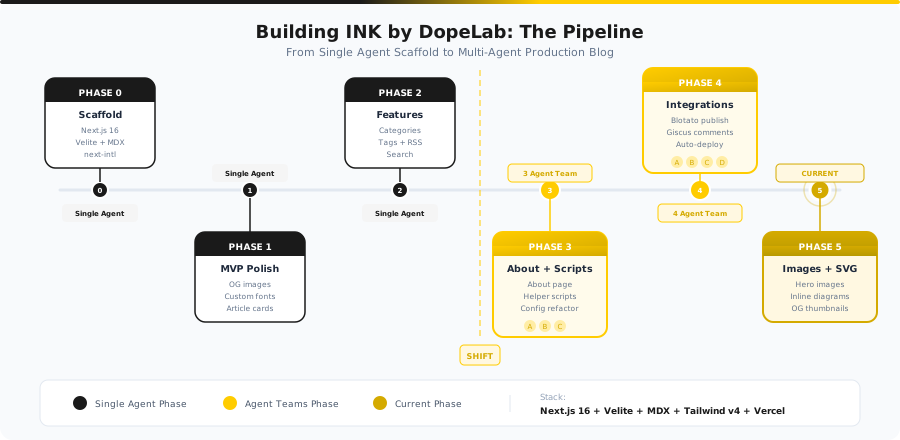
Phase 0: Scaffold (single agent)
Phase 1: MVP Polish (single agent)
Phase 2: Features (single agent)
Phase 3: 3 agents in parallel ← Agent Teams starts here
Phase 4: 4 agents in parallel
Phases 0-2 were single-agent work because the tasks were sequential — scaffold first, then polish UI piece by piece. Once the base was solid, I unleashed Agent Teams.
Phase 3: Three Agents at Once
commit 6a03343 — 2026-03-02 14:18
I spawned 3 agents working on completely separate concerns:
| Agent | Task | Output |
|---|---|---|
| about-page | Build the About page (/about) — 6 sections | src/app/[locale]/about/page.tsx + i18n keys |
| content-cli | Build article scaffolding script | scripts/new-article.sh (255 lines) |
| translate-cli | Build auto-translate script TH→EN | scripts/translate.sh (285 lines) |
All 3 finished around the same time. 881 new lines of code across 7 files.
File ownership is everything
The most important rule of Agent Teams: never let 2 agents edit the same file. I had to plan ahead which agent touches which files — about-page owns the entire src/app/[locale]/about/ folder, content-cli owns scripts/new-article.sh, translate-cli owns scripts/translate.sh. The tricky part was i18n keys in messages/*.json — I assigned those to a single agent (about-page) to avoid merge conflicts.
The About Page
The agent built a complete About page with 6 sections:
- Hero section
- Who we are (stat cards)
- AI Team (6 agent cards)
- What is INK (concept explanation)
- Tech stack (pill badges)
- CTA
All of it with dark/light mode and i18n (TH+EN) baked in from the start.
The Scripts
new-article.sh — scaffold a new article with one command. Picks from 5 categories, accepts tags, generates TH+EN templates. The article you're reading was scaffolded with this exact script:
./scripts/new-article.sh building-blog-with-agent-teams \
  --category "AI Workflow" \
  --tags "agent-teams,claude-code,next-js,automation,blog"
translate.sh — auto-translates TH→EN via the Claude API. Pure bash + curl + jq, no SDK dependency. Has --dry-run for previewing output.
Phase 4: Four Agents at Once
commits e85d7ae through 76a3b32 — 2026-03-02 14:39-14:42
This phase spawned 4 agents:
| Agent | Task | Output |
|---|---|---|
| social-post | Blotato auto-post script | scripts/post-social.sh (483 lines) |
| social-visual | Carousel/visual generator | scripts/create-social-visual.sh (482 lines) |
| vercel-deploy | Verify Vercel auto-deploy config | Config verification |
| giscus-comments | Comments via GitHub Discussions | src/components/blog/comments.tsx (40 lines) |
The social scripts alone produced 987+ new lines of code.
The Comments Component
The Giscus agent built a React component that:
- Uses
@giscus/reactbacked by GitHub Discussions - Supports dark mode (reads from
next-themes) - Switches language based on locale (TH/EN)
- Lazy mounts (no server render, waits for client)
// src/components/blog/comments.tsx
"use client";

import GiscusComponent from "@giscus/react";
import { useTheme } from "next-themes";
import { useLocale } from "next-intl";

export function Comments() {
  const { resolvedTheme } = useTheme();
  const locale = useLocale();

  return (
    <GiscusComponent
      repo="tordash/ink-dopelab"
      repoId="R_kgDORb6CeA"
      mapping="pathname"
      theme={resolvedTheme === "dark" ? "dark_dimmed" : "light"}
      lang={locale === "th" ? "th" : "en"}
    />
  );
}
40 lines. Fully functional. Scroll down to the bottom of this article — the comment section you see was built by this agent.
Results
The Real Timeline (from git log)
01:09  — .env.example
10:32  — Typography fix
11:38  — Phase 1: OG images, brand fonts, share buttons
12:19  — Phase 2: Category/tag pages, RSS, search
14:18  — Phase 3: About page + 2 scripts (3 agents)
14:39  — Phase 4a: Social scripts (2 agents)
14:42  — Phase 4b: Giscus comments (1 agent)
14:42  — CHANGELOG update
Phase 3 (3 agents) completed in ~2 minutes after Phase 2 finished. Phase 4 (4 agents) completed in ~3 minutes after Phase 3.
What We Got
| Type | Count |
|---|---|
| Bash scripts | 4 (1,505 lines) |
| Config file | 1 (22 lines) |
| React components | 1 (40 lines) |
| Pages | 2 (About TH+EN) |
| i18n keys | 28 keys (TH+EN) |
| Total new code | ~1,900 lines |
All of this from 2 phases that took a combined ~5 minutes.
Limitations You Should Know
1. Token Cost Is Real
Agent Teams spawns multiple Claude instances simultaneously. Each one consumes its own tokens. Phase 3 (3 agents) + Phase 4 (4 agents) = 7 instances total. The cost isn't 7x a single agent (because each has shorter context), but it's definitely more than doing things sequentially.
2. File Conflicts Are a Real Problem
If you plan poorly, 2 agents will edit the same file and create merge conflicts. I hit this with i18n keys — multiple agents wanted to add entries to messages/th.json. The fix was to centralize: one agent owns the shared files.
3. Not for Sequential Work
If task B needs the output of task A, Agent Teams won't help. You need tasks that genuinely parallelize — independent work with separate file ownership.
When to Use (and When Not To)
Use it: Tasks that split cleanly into independent units with no file overlap. Building 3 scripts simultaneously. Creating a page + component + config at the same time.
Skip it: Tasks that need back-and-forth iteration, depend on previous output, or are small enough for a single agent to handle in 30 seconds.
The Final Tech Stack
The complete INK by DopeLab blog:
- Framework: Next.js 16 + Velite (MDX content layer)
- i18n: next-intl (TH default + EN)
- Styling: Tailwind v4 + custom CSS variables (dark/light)
- Fonts: Inter + Sarabun (body), Special Elite + Charmonman (display)
- Comments: Giscus (GitHub Discussions)
- Analytics: Vercel Analytics
- Deploy: Vercel (auto-deploy from GitHub push)
- Content: 8 articles (TH+EN = 16 MDX files)
Built in 1 day from git init to production at ink.dopelab.studio.
The Takeaway
Agent Teams isn't magic — it's a tool that requires upfront planning. You have to define clear file ownership, pick tasks that parallelize well, and accept the higher token cost. But when the conditions are right, it turns 2-3 hours of work into 5 minutes. The blog you're reading is the proof.